TableConfig
TableConfig controls how tables are displayed when rendering objects, including headers, separators, indices, and border styles.
Table of Contents
Properties
| Property | Type | Default | Description |
|---|---|---|---|
ShowArrayIndices |
bool |
true |
Show index numbers for array elements |
ShowTableHeaders |
bool |
true |
Show column headers in tables |
NoColumnWrapping |
bool |
false |
Prevent text wrapping in columns |
ExpandTables |
bool |
false |
Expand tables to full width |
ShowMemberTypes |
bool |
false |
Show a column with member types |
ShowRowSeparators |
bool |
false |
Show separator lines between rows |
BorderStyle |
TableBorderStyle |
Rounded |
Border style for tables (see below) |
Note: Collection truncation is now configured via TruncationConfig.
Border Styles
The BorderStyle property controls the characters used for table borders. This is useful for terminals that don’t properly render Unicode box-drawing characters.
| Style | Description | Example Characters |
|---|---|---|
Rounded |
Rounded corners (default) | ╭─╮│╰─╯ |
Square |
Square corners | ┌─┐│└─┘ |
Ascii |
ASCII only (maximum compatibility) | +-+\|+-+ |
None |
No borders | |
Heavy |
Heavy/bold lines | ┏━┓┃┗━┛ |
Double |
Double lines | ╔═╗║╚═╝ |
Minimal |
Minimal with horizontal lines | ─ |
Markdown |
Markdown-compatible format | \|---\| |
Examples
Change Border Style
Fix terminal rendering issues by changing the border style:
// For terminals with Unicode issues (VS Code, some Windows Terminal fonts)
// Use ASCII for maximum compatibility
obj.Dump(tableConfig: new TableConfig { BorderStyle = TableBorderStyle.Ascii });

// Use Square instead of Rounded if only corners are broken
obj.Dump(tableConfig: new TableConfig { BorderStyle = TableBorderStyle.Square });
Set globally to fix all dumps:
// Fix for entire application
DumpConfig.Default.TableConfig.BorderStyle = TableBorderStyle.Ascii;

// All dumps now use ASCII borders
myObject.Dump();
Show Row Separators
Add horizontal lines between rows for better readability:
obj.Dump(tableConfig: new TableConfig { ShowRowSeparators = true });
Show Member Types
Display a column showing the type of each member:
obj.Dump(tableConfig: new TableConfig { ShowMemberTypes = true });
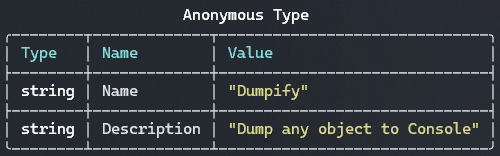
Combined: Row Separators and Member Types
obj.Dump(tableConfig: new TableConfig
{
    ShowRowSeparators = true,
    ShowMemberTypes = true
});
Hide Table Headers
obj.Dump(tableConfig: new TableConfig { ShowTableHeaders = false });
Hide Array Indices
var arr = new[] { "a", "b", "c" };
arr.Dump(tableConfig: new TableConfig { ShowArrayIndices = false });
Expand Tables
Make tables expand to fill available width:
obj.Dump(tableConfig: new TableConfig { ExpandTables = true });
Prevent Column Wrapping
Keep text on single lines (may cause horizontal scrolling):
obj.Dump(tableConfig: new TableConfig { NoColumnWrapping = true });
Global Table Configuration
// Set globally
DumpConfig.Default.TableConfig.ShowRowSeparators = true;
DumpConfig.Default.TableConfig.ShowMemberTypes = true;

// All dumps now use these settings
myObject.Dump();
Complete Table Configuration
var tableConfig = new TableConfig
{
    ShowArrayIndices = true,
    ShowTableHeaders = true,
    ShowRowSeparators = true,
    ShowMemberTypes = true,
    ExpandTables = false,
    NoColumnWrapping = false,
    BorderStyle = TableBorderStyle.Rounded
};

obj.Dump(tableConfig: tableConfig);
Use Cases
Detailed Object Inspection
For detailed inspection, enable all display options:
obj.Dump(tableConfig: new TableConfig
{
    ShowRowSeparators = true,
    ShowMemberTypes = true,
    ShowTableHeaders = true,
    ShowArrayIndices = true
});
Compact Output
For minimal output, disable extra information:
obj.Dump(tableConfig: new TableConfig
{
    ShowTableHeaders = false,
    ShowArrayIndices = false,
    ShowMemberTypes = false
});
Troubleshooting Terminal Display Issues
If table borders appear as garbled characters or question marks, your terminal or font may not support the Unicode box-drawing characters used by the default Rounded border style.
VS Code Terminal
VS Code’s integrated terminal may not render rounded corners correctly with some fonts:
// Option 1: Use ASCII borders (maximum compatibility)
DumpConfig.Default.TableConfig.BorderStyle = TableBorderStyle.Ascii;

// Option 2: Use Square borders (works with most fonts)
DumpConfig.Default.TableConfig.BorderStyle = TableBorderStyle.Square;
Windows Terminal
If corners display incorrectly but other borders are fine:
// Square borders use simpler Unicode characters
DumpConfig.Default.TableConfig.BorderStyle = TableBorderStyle.Square;
CI/CD Logs
For build logs and CI environments where rendering may vary:
DumpConfig.Default.TableConfig.BorderStyle = TableBorderStyle.Ascii;
See Also
- Configuration Overview
- Global Configuration
- TruncationConfig - Configure collection truncation
- Collections Feature