Configuration Overview
Dumpify is highly configurable. You can customize nearly every aspect of how objects are rendered, from colors to member filtering to output dimensions.
Table of Contents
Configuration Hierarchy
Dumpify uses a layered configuration system:
- Per-Dump Configuration - Options passed directly to
.Dump()methods - Global Configuration - Defaults set via
DumpConfig.Default
Per-dump configuration always takes precedence over global configuration.
Per-Dump vs Global Configuration
Per-Dump Configuration
Pass configuration options directly to the .Dump() method:
obj.Dump(
    label: "My Object",
    maxDepth: 3,
    colors: new ColorConfig { PropertyValueColor = new DumpColor("#FF5733") },
    tableConfig: new TableConfig { ShowRowSeparators = true }
);
Global Configuration
Set defaults that apply to all dumps:
// Set global defaults
DumpConfig.Default.MaxDepth = 5;
DumpConfig.Default.ColorConfig.TypeNameColor = new DumpColor("#FFD700");
DumpConfig.Default.TableConfig.ShowRowSeparators = true;

// Now all dumps use these settings
obj.Dump(); // Uses global settings
Combining Both
// Set global defaults
DumpConfig.Default.MaxDepth = 5;

// Override for a specific dump
obj.Dump(maxDepth: 2); // Uses depth 2, not 5
Configuration Classes
Dumpify provides several configuration classes, each controlling different aspects:
| Class | Purpose | Documentation |
|---|---|---|
| DumpConfig | Main configuration container | Global Configuration |
| ColorConfig | Color customization | ColorConfig |
| TableConfig | Table display options | TableConfig |
| MembersConfig | Member filtering | MembersConfig |
| TypeNamingConfig | Type name display | TypeNamingConfig |
| TypeRenderingConfig | Value rendering | TypeRenderingConfig |
| OutputConfig | Output dimensions | OutputConfig |
| TruncationConfig | Collection truncation | TruncationConfig |
Quick Examples
Disable Colors
// Per-dump
obj.Dump(colors: ColorConfig.NoColors);

// Note: ColorConfig cannot be reassigned globally since it's a read-only property.
// To disable colors globally, set individual color properties to null or use per-dump configuration.
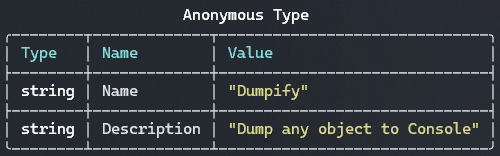
Show Row Separators and Member Types
obj.Dump(tableConfig: new TableConfig
{
    ShowRowSeparators = true,
    ShowMemberTypes = true
});
Include Private Members and Fields
obj.Dump(members: new MembersConfig
{
    IncludeFields = true,
    IncludeNonPublicMembers = true
});

Hide Type Names
obj.Dump(typeNames: new TypeNamingConfig { ShowTypeNames = false });
Limit Collection Size
largeArray.Dump(truncationConfig: new TruncationConfig { MaxCollectionCount = 10 });
Next Steps
- Global Configuration - Learn about
DumpConfig.Default - ColorConfig - Customize colors
- TableConfig - Configure table display
- MembersConfig - Filter members
- TruncationConfig - Configure collection truncation